Great news for every student grinding through SAT Math practice and ACT Math practice – MentoMind just got a lot smarter. Step-by-step video solutions from Think10x.ai, generated intelligently behind the scenes, are now built directly into the MentoMind web app. Struggling with a tricky math problem? Now you can simply click, watch, and see how to solve this problem, with no more staring at a static answer explanation wondering how it got there.
In this blog, we’ll walk through what the feature does, where it’s available, how the experience works for students, and how course administrators can manage it.
What is the “Watch Video Solution” Feature?
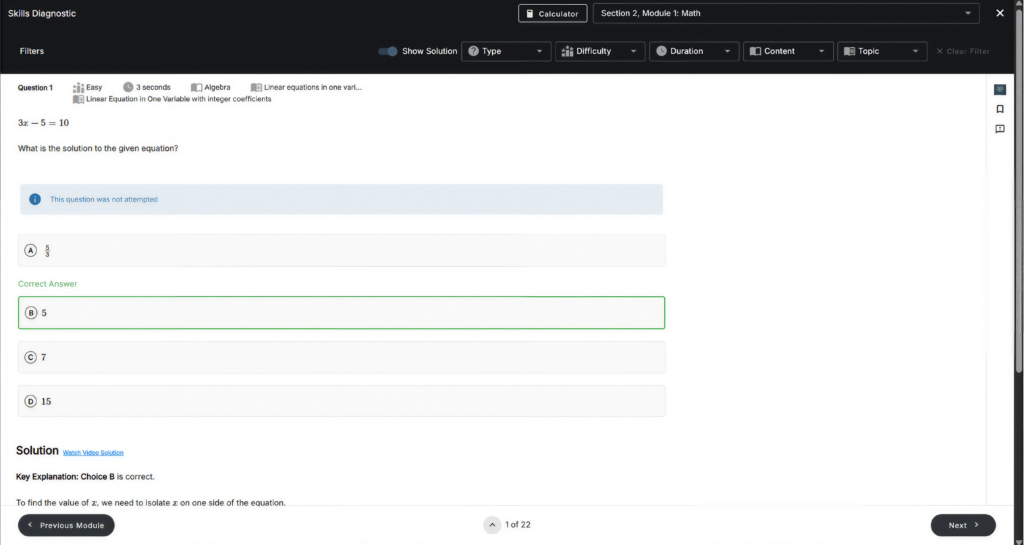
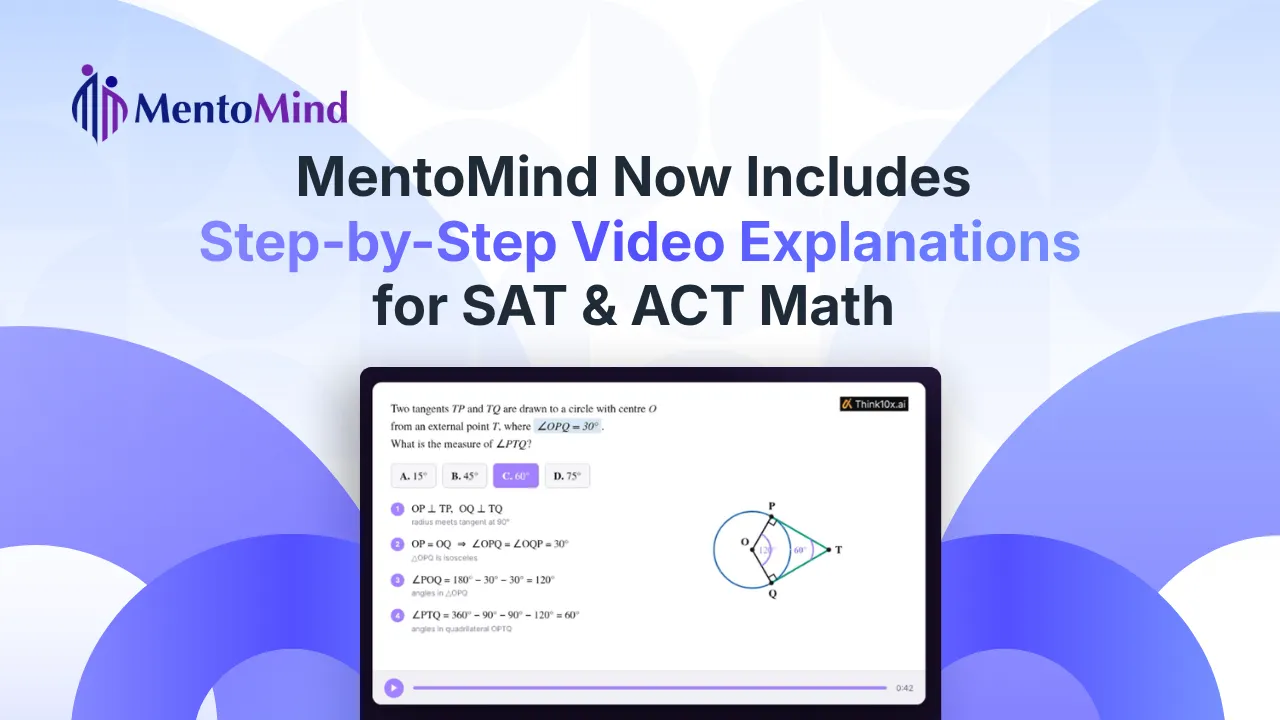
Right next to the Solution heading on eligible questions, you’ll now see a new “Watch Video Solution” link. Clicking it opens a short, narrated explainer video that walks through the problem step by step, showing you exactly how to think through and solve it, not just what the final answer is.
Instead of reading a block of text and hoping it clicks, you get a guided, visual walkthrough that feels like having a tutor pause and explain the “why” behind every step.
You’ll find this new option across all the places you already review your work on MentoMind –
- Practice question results
- Mock test and module test results
- Quiz, Challenge, and Problem Set results
- Your Bookmark and Activity review lists
Why This is a Big Deal for SAT Math Practice and ACT Math Practice
Text-based solutions are great for a quick check, but they don’t always explain the reasoning. Video solutions change that by offering –
- Better concept clarity – see the logic unfold step by step, instead of jumping straight to the answer
- Easier understanding – narrated explanations make abstract math concepts feel more concrete
- On-demand help – available exactly when you need it, right from the solution screen
For visual and auditory learners especially, this can make the difference between memorizing an answer and actually understanding the method behind it. A systems of equations problem is a good example of exactly the kind of step-by-step reasoning a video can make click.
Where It’s Available Right Now
To start, video solutions are live for Math questions in SAT Math practice and ACT Math practice courses. Think10x.ai’s video generation technology currently delivers the most reliable results for math content, so we’re rolling it out there first, with more subjects planned down the line.
One important detail: eligibility is checked at the question level, not the section level. Some sections, especially in problem sets and mixed-subject practice, are labeled “Math” even though they contain a blend of math, English, and reading questions. MentoMind checks each individual question’s own subject before showing the link, so “Watch Video Solution” only ever appears on questions that are genuinely math, no matter how the surrounding section is labeled.
It’s also worth noting that passage-based questions never show this option, in any course, whether SAT, ACT, or otherwise, since video walkthroughs are built for solvable, step-by-step problems rather than reading passages.
How the Student Experience Works
Watching a video solution takes just a few clicks –
- Open a question’s solution and click “Watch Video Solution” next to the Solution heading.
- A request goes out for the video tied to that question.
- The video opens in an overlay player on the same screen, so there’s no losing your place.
The first time a question’s video is requested, there’s a short generation delay while Think10x.ai prepares the explanation. You’ll see a brief “preparing” state during this step. After that, the video is cached, so every future student who requests that same question gets it back almost instantly, with no regeneration wait.
Built for Speed, Scale, and Control
Under the hood, this was built to be fast and efficient –
- On-demand generation – Videos are created only when a student actually asks for them, not pre-generated in bulk
- Smart caching – Once a video exists for a question, it’s reused instantly rather than regenerated
- Course-level control – We can turn the feature on or off per course through a settings table with a toggle switch per row. Regular Admins and Admin-cum-Teachers can view which courses have it enabled, but only a Super Admin can change the setting.
This gives institutions full flexibility to introduce video solutions gradually, course by course, based on what works best for their students.
A Powerful Combination
This launch brings together the best of both platforms, combining MentoMind’s robust practice and testing environment with Think10x.ai’s intelligent video explanation engine. The result is a smoother, more supportive learning experience. Getting a question wrong is no longer a dead end, but the start of a clearer path to actually understanding the concept.
Frequently Asked Questions
A short, narrated walkthrough of the problem. Available with a single click directly from the solution screen.
Yes, both SAT Math practice and ACT Math practice are covered, since that’s currently where Think10x.ai’s video technology performs most reliably.
Only Math questions, checked individually rather than by section label. Passage-based questions never show this option, regardless of course.
Instant if it already exists for that question. Otherwise, there may be a brief wait for generation, after which it is cached for instant playback next time.
A Super Admin, at the course level. Other admin roles can view the setup but can’t change it.
Try It Today
Next time a question in your SAT Math practice or ACT Math practice trips you up, look for the “Watch Video Solution” link right next to the Solution heading. The video will open in an overlay right on the same screen, so you never lose your place. It’s just one click between a static answer and a clear step-by-step walkthrough of how to solve the problem.
More subjects and courses are on the way. Stay tuned!