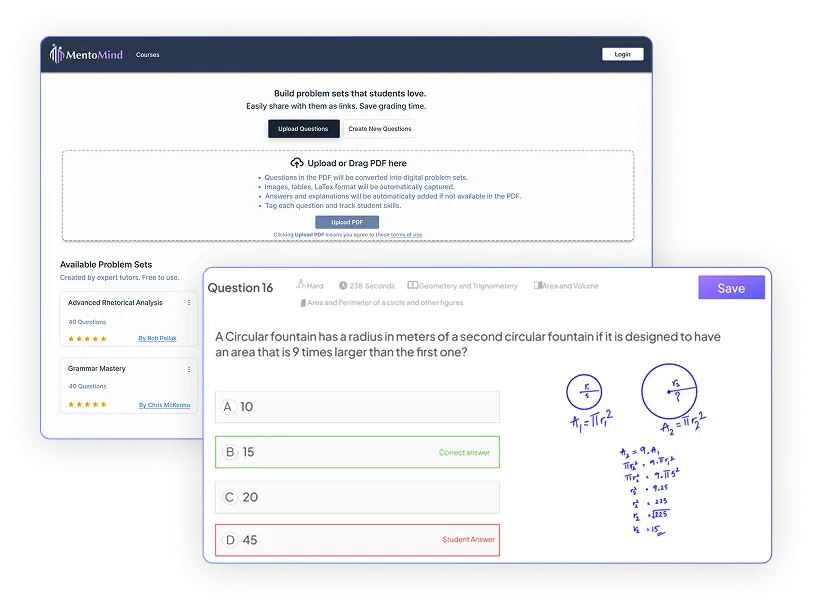
Turn any worksheet into auto-graded, trackable homework. Fast.

Upload a PDF (or create new questions with AI), share with students as links, and see results instantly. You can try it without creating an account.

Tutoring is personal. Grading shouldn’t be.

Stop chasing Printed papers, Google Docs, PDF, Excel and email threads. TutorHub turns any worksheet into a digital assignment with auto-grading and clean analytics—so you spend time teaching, not grading.

How it works (4 steps)

Step 1

Digitize in minutes

Upload a PDF, or use AI to create questions and explanations for any subject. Review, edit, and approve before you share.

Step 2

Choose access & share

Choose the access setting and send the link. Students can open it on any device.

Step 3

View results

See scores, time-on-task, question-level insights, and common mistakes instantly.

Step 4

Review & respond

Open any submission, annotate directly on the question, highlight errors, and leave comments to clarify steps. Use threaded feedback to answer doubts and guide students to the right approach.

Key benefits

Digitize in minutes

Turn PDFs into auto-graded problem sets without retyping.

AI Question Builder

Generate new questions with clear answers & explanations.

Flexible Sharing

Open link (no student login) or account-required—your choice.

Detailed Analytics

Per-student and per-question breakdowns.

Expert Problem Sets

Expert-crafted problem sets from our tutor community. Ready to assign and easy to customize.

Privacy-first

Your content and student data stay yours.


On-screen annotations

Annotate to show how to solve a problem and save them as notes

Frequently asked questions

How do I convert my PDF worksheets into auto-graded assignments?

Upload a PDF, review extracted questions, and share a link—students get auto-graded digital worksheets in minutes.

Upload a PDF by clicking “Upload PDF” into TutorHub. This PDF to assignment converter extracts questions and answer choices automatically.

Review the extracted questions and make any edits. Adjust answer options, fix formatting, or add explanations before finalizing.

Share the auto-gradable worksheet with students via a link. Students complete it on any device, and you see results with tutor analytics immediately.

Convert worksheets without an account, though signing up saves your assignments and reports.

Yes, share via fun quiz link (no login) or practice link (students log in for tracking).

TutorHub offers two sharing options based on your needs.

Fun Quiz Link provides frictionless access with no student login required. Students click and start working immediately on any device. Use this for quick assessments or homework when you don’t need historical tracking.

Practice Link requires students to log in. This unlocks tracking features: performance history across assignments, and detailed progress analytics over time.

Choose the approach that fits each assignment. Switch between fun quiz and practice links based on whether you need tracking for that specific worksheet.

Yes, TutorHub is free to try with full functionality and no credit card required.

Upload PDF worksheets, create auto-graded digital worksheets, share with students, and view results without paying. No credit card needed.

Free accounts include core features with usage limits: worksheet conversion, student sharing via fun quiz or practice links, auto-grading, and a tutor analytics dashboard.

Paid plans offer higher capacity, more saved assignments.

Yes, highlight errors, add comments, and draw on submissions directly. All annotations save to student reports.

Click any student submission to open the review interface. Use the annotation toolbar to mark up digital worksheets like pen and paper.

You can highlight errors, draw circles around mistakes, add arrows to specific steps, and write feedback directly on questions. Leave detailed comments explaining the correct approach.

All annotations save automatically to that student’s report. Both you and the student can reference them in future sessions for review.

This works well for showing math steps, circling grammar errors, or demonstrating problem-solving strategies.

TutorHub is an LMS alternative for tutors—no institutional setup required, built specifically for independent teaching.

TutorHub is a Google Classroom alternative for tutors who need simple, powerful tools without administrative overhead. No institutional accounts or complex setup required. Upload a worksheet and start teaching within minutes.

Key differences:

  • PDF to assignment converter – Upload worksheets and get auto-graded digital worksheets instantly
  • Flexible student access – Share via fun quiz link (no login) or practice link (tracked accounts)
  • Tutor analytics dashboard – See question-level performance reports and common mistakes
  • On-screen annotations – Mark up digital worksheets and save feedback to reports
  • Simple sharing – Works on all devices without app downloads
  • Privacy-first – Your content and student data stay yours

Google Classroom works for teachers managing 30+ students. TutorHub is optimized for tutors handling smaller no. of students who need targeted homework and detailed tracking without administrative overhead.

You own all content you upload—your worksheets, questions, and student data remain completely yours.

You retain complete ownership of everything you upload. Your digital worksheets and teaching materials belong entirely to you.

Your uploaded PDFs are processed only to create assignments. Student data is stored securely with encryption. Content is never shared without permission.

Export assignments, download student data, or delete all content anytime. No restrictions.

If you share a problem set with the community, you can revoke access whenever you want.

Yes, view question-level performance reports showing which questions students answer incorrectly, time spent on each question etc.

OUR BLOG

Don’t miss our articles

We use cookies to personalize your experience. By using our website you agree to our Terms and Conditions and Privacy Policy.