What Is the PSSA and Why Does PSSA Test Prep Look Different in 2026?
PSSA stands for Pennsylvania System of School Assessment. It is an annual state test for Pennsylvania public school students in grades 3 to 8, measuring proficiency in English Language Arts, Mathematics, and Science. Scores run from 220 to 880 across four performance levels: Below Basic, Basic, Proficient, and Advanced.
In April 2024, the Pennsylvania Department of Education mandated that all PSSA and Keystone Exams move to fully online administration by Spring 2026. ELA ran April 20 to 24, 2026, and Math ran April 27 to May 1, 2026. Paper/pencil testing remains available only for students with qualifying IEPs or 504 Plans.
PSSA test prep can no longer rely on printed worksheets. Students need to practice using digital tools, interact with question types that cannot exist on paper, and build fluency with the platform their test runs on. Only 41.7% of Pennsylvania students scored proficient or Advanced on the PSSA Math test, and ELA proficiency rates fell to 49.9% statewide in the most recent results. Tutors who close that gap fastest target not just content, but the exact format of questions on test day.
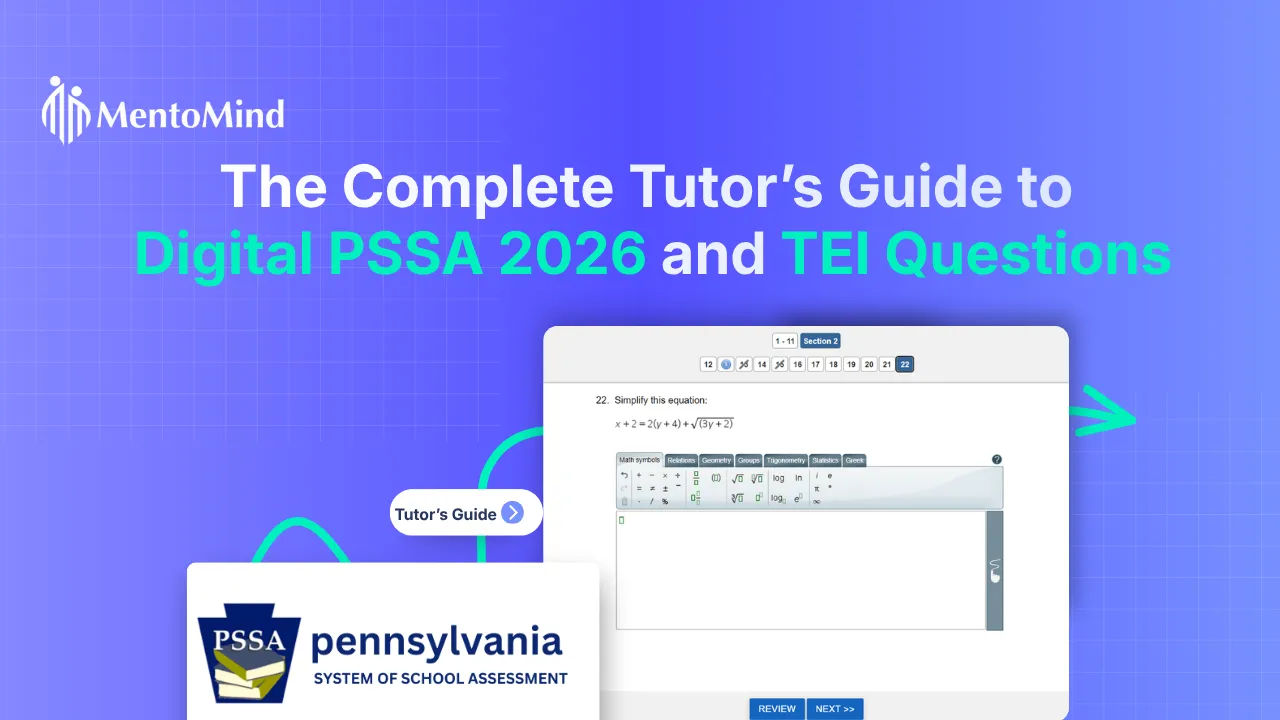
Understanding the DRC Insight Platform
The PSSA runs on DRC Insight, a secure web-based testing system by Data Recognition Corporation. Elementary students in grades 3 to 5 use district-issued iPads. Middle schoolers in grades 6 to 8 use laptops or Chromebooks. External keyboards are permitted with iPads. There is no paper answer sheet, and every response is captured digitally in real time.
Built-in tools tutors must know
Walk through these tools with students before any practice content, not after.
- Highlighter – Marks key text in passages. Essential for ELA reading sections.
- Strikethrough / Eliminator – Crosses out ruled-out answer choices. Teach this as the digital replacement for paper-based elimination, explicitly as a practiced skill.
- Scratch Pad / Notes Tool – A digital notepad for working through problems. Physical scratch paper is also allowed but collected at session end.
- Calculator and formula sheets – The calculator is available for specific Math sections only. Grade 3 has no calculator. Grades 4 to 8 have a non-calculator portion before calculator use opens. Formula sheets are embedded for grades 4 to 8 in Math and Science.
Every PSSA Question Type Explained for Tutors
The digital PSSA uses five item types. Three of them are new to most students and carry the highest stakes.
1. Multiple choice (MC), worth 1 point
Four answer choices, one correct. Students click the radio button. Found across all subjects and grades. Teach students to use the strikethrough tool digitally instead of crossing out on paper.
2. Evidence-based selected response (EBSR), worth 2 to 3 points
EBSR is the most consequential item type on the ELA PSSA for all grades 3 to 8. Part A asks the student to analyze a passage. Part B asks for the specific textual evidence supporting their Part A answer.
Partial credit rules matter. Getting Part A correct but Part B wrong earns partial credit. Getting Part A wrong earns zero, regardless of Part B. Grades 4 to 8 tests include a minimum of four multipoint items. Grade 3 includes a minimum of three.
Tutoring strategy. Students lose partial credit not from misreading the text, but from choosing plausible rather than precise evidence in Part B. Drill the link between inference and exact textual proof in isolation before combining it with full passage reading.
3. Technology-enhanced items (TEI), worth 1 to 3 points
Technology-Enhanced Items assess skills that cannot exist on paper and appear across ELA, Math, and Science.
- Text Highlighting – Students select words or phrases in a passage as their answer. The biggest risk is over-highlighting. Students used to underlining on paper select entire paragraphs instead of the precise phrase the question targets. Practice digital precision on any online text before PSSA materials.
- Drag-and-Drop – Students move labels or answer choices into diagrams, tables, or graphic organizers. Used across all three subjects.
- Hot Spot / Click-to-Select – Students click on parts of an image or diagram. Most common in Science for labeling illustrations.
- Open-Response / Numeric Entry – Students type a computed answer into a response box. Used in Math. A single transposed digit eliminates the entire point. Teach students to re-read every number before moving on.
4. Text-dependent analysis (TDA), grades 4 to 8 ELA
The TDA is the extended writing prompt on the ELA PSSA. Students read one or more passages and type a full analytical essay into the online text editor, up to 5,000 characters. The 2025 update added indent, outdent, and italics tools that did not exist in the paper format.
Tutoring strategy. Writing ability does not transfer automatically to typed performance under time pressure. Run timed typed essays from the first session, starting at 10 minutes and building to 20. Score every response against the official PDE TDA rubric.
Why TEI Preparation Matters in Math and Science Too
TEI preparation is not an ELA-only concern. Math sections include numeric entry, grid-in formats, and drag-and-drop items on number lines and coordinate planes. Science sections for grades 5 and 8 include diagram labeling, hot spot selection, and ordering sequences through drag-and-drop. Every tutor working in these subjects needs to build the same digital interaction habits as ELA tutors.
Free official practice resources
- PSSA Online Tools Training (OTT) – The most important resource. Available at wbte.drcedirect.com/PA. Hands-on practice with all DRC Insight tools and item types inside the real platform.
- PSSA Item Samplers – Published by PDE at pa.gov under PSSA Resource Materials. From 2025 onward, samplers are live in the online platform with interactive TEIs, sample student responses, and scoring rationales. Use these in the platform, not the PDF.
- PSSA Student Tutorials – Short videos of 10 to 20 minutes walking students through platform features, available by subject and grade via the DRC Insight Insight Training tab.
A Six-Step PSSA Test Prep Protocol for Tutors
Step 1. Complete the OTT first
Run the Online Tools Training for the student’s grade and subject before any content review. Platform fluency comes before content.
Step 2. Diagnose by item type, not just standard
A student struggling with EBSR may understand the text perfectly but not the two-part structure. Content gaps and format gaps need different solutions.
Step 3. Use item samplers in the online platform
The PDF version misses the interactive element. Students must practice TEI interaction exactly as it appears on test day.
Step 4. Reserve 20 to 30% of each session for TEI practice
Include highlighting, drag-and-drop, and numeric entry in every session using digital tools. Spacing this practice across multiple sessions rather than massing it before the test significantly improves retention.
Step 5. Run timed typed writing for grades 4 to 8 ELA
At least one timed typed essay per session, starting at 10 minutes. Score every response against the PDE TDA rubric.
Step 6. Normalize the platform before test day
Digital test-taking anxiety is a documented performance risk. Regular low-stakes DRC Insight exposure is the most effective fix.
How PSSA Scores Work and Why Partial Credit Matters
PSSA scores run from 220 to 880 and do not affect report card grades or class placement. They exist for state accountability only.
For EBSR and multi-point TEIs, partial credit is available. Teaching students to always attempt Part B, even when uncertain, is the simplest point-protection habit a tutor can build. Consistent partial credit on EBSR outperforms skipping Part B every time.
Final Thoughts
The 2026 PSSA is no longer just a paper test moved onto a screen. It is a different testing experience altogether. Students must read, analyze, highlight, drag, type, and respond confidently within a fully digital environment, often under strict time limits.
That is why effective PSSA test prep now goes beyond worksheets and content review alone. Students who are already comfortable with the platform can focus fully on reasoning through the question instead of navigating the format. For tutors, building that familiarity early may be one of the simplest ways to reduce avoidable mistakes and help students perform closer to their true ability on test day.
Frequently Asked Questions
Pennsylvania System of School Assessment. The annual state test for grades 3 to 8 in ELA, Math, and Science.
A two-part ELA question. Part A tests comprehension. Part B asks for the textual evidence supporting the Part A answer. Partial credit is available if Part A is correct and Part B is not.
No. TEIs appear in Math and Science too, including numeric entry, drag-and-drop, and hot spot items.
No. PSSA scores are used for state accountability reporting only.
Tutors can access free PSSA practice resources through the official DRC Insight Online Tools Training platform, which lets students practice using the same digital tools and question formats they will see on test day. The Pennsylvania Department of Education also publishes official PSSA Item Samplers with Technology-Enhanced Items, scoring guides, and sample responses under its PSSA Resource Materials section.